
The days of dialing a number, and then dialing your voicemail password when asked by a robotic voice are gone. These days, your voicemail password can be reset with a few clicks. This is amazing when you wish to safeguard those voicemails from the eyes and ears of everybody else.
Fortunately, your iPhone still lets you have a passcode for your voicemail in addition to the password you set to access your phone. See How To Reset Voicemail Password On Your iPhone?:
How Can I Reset My Voicemail Password On My iPhone?
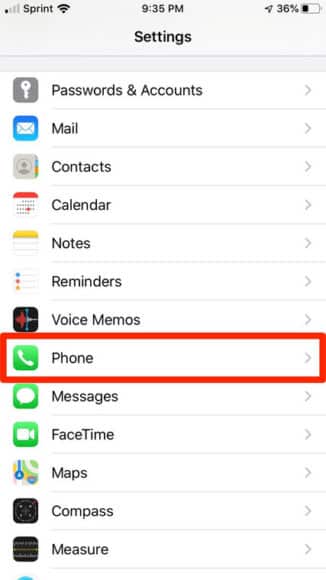
- Launch the Settings application on your iPhone.
- Swipe down to the item “Phone.” This option has a green icon with a photo of a regular phone to the left of it. Click the option.
You Might Also Want To Read- How To Report Road Incidents In Google Maps On Your iPhone?
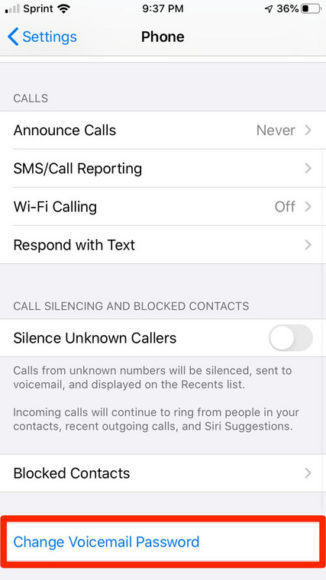
- On the next page, swipe down to the option named “Change Voicemail Password.” Unlike the remaining options listed, the text is colored blue. Click it.
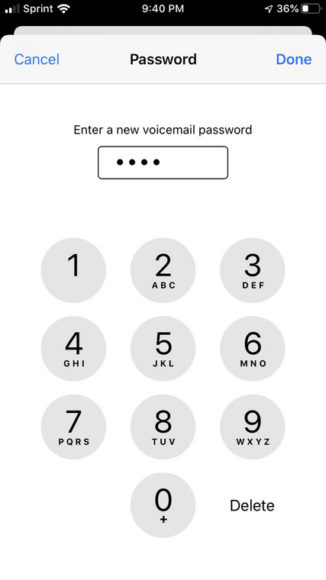
- You will be asked to type in a new voicemail password. You can type in a minimum of four, maximum of 10 words password.
You Might Also Want To Read- How To Forget A Wi-Fi Network On Your iPhone?
- Immediately you have typed in your preferred password, click “Done” in the upper right-hand corner.
- You will be asked to type in the new password again to make sure there are no mistakes. Do that and then tap “Done ” one more time.
That is that. You just changed your voicemail password.