
There are times where you want to add a little emphasis to certain words in your messages. If you’re on WhatsApp, there are four types of emphasis you can add to messages, either inline or from a menu.
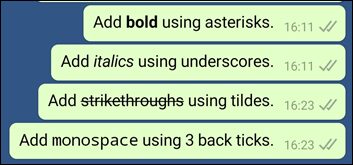
The types of formatting that can be applied to a Whatsapp message include bold, italics, strikethrough, and monospacing. If you would like to apply the formatting manually, you need to place a certain punctuation mark on either side of the word (or series of words).
- Bold- Place an asterisk on either side (*bold*).
- Italicize- Place an underscore on either side (_italic_).
- Strikethrough- Place a tilde on either side (~strikethrough~).
- Monospace- Place three backticks on either side (“`monospace“`).
When the message is sent, it will be displayed with the chosen formatting.
If you aren’t big on typing—especially if the monospace is the format you would like to use (the backtick is often hidden away)—you can also use the built-in formatting menu.
Tap and hold on the word you would like to format. A menu will pop up on the screen. If you’re using an Android device, you should already see the Bold option. If you would like to access other formatting options, tap on the three dots on the right side of the menu. If you’re on iOS, tap on the BIU option.
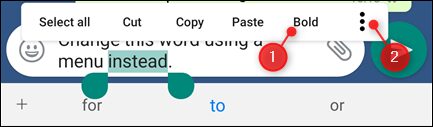
A list of other formatting options which you can choose from will appear.
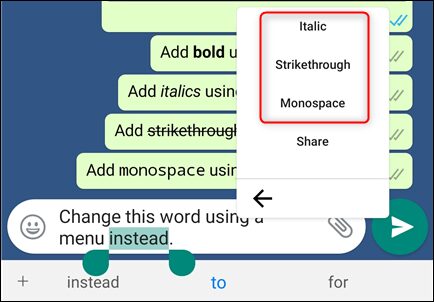
Now, select the formatting option you would like to use (In this guide we use monospace). The relevant punctuation mark will be automatically added to the text.
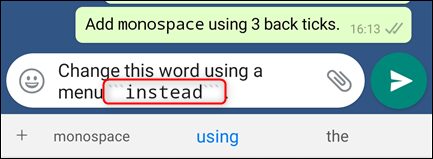
When you’re done composing the message, tap on the Send button. Your message will be sent with the formatting applied.
You can also add multiple formats to messages by using any combination of bold, italic, and strikethrough as seen in the image below.

The one caveat is monospace. The limitation is there because the formatting option lets you include asterisks, underscores, or tildes in a message without them changing how the text appears.