
Podcasts are like mobile radio shows, created for specific topics such as politics, business, relationships e.t.c. Because of how popular they are, podcasts are simple to access and listen to with your Android device or tab. The Google Play Music application is required, and it is already pre-installed on most Android phones.
Page Contents:
In this tutorial, we will show you how to find, download, and listen to a podcast on Android using Google Play. See How To Listen To Podcasts On Your Android Device Using The Google Play Music App?
How Can I Listen To Podcasts On Android Phones?
- If you want to listen to a podcast, launch the Google Play Music application. If you cannot find it, click on the Google Play Store app, then click on the 3 horizontal lines in the upper-left corner to open a menu. Click “Open Music app” to access Google Play Music. If it is not installed, search for it in the Google Play Store and have it downloaded.
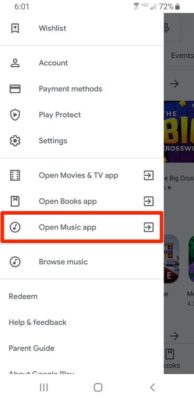
You Might Also Want To Read: How to customize the Podcasts app on your iPhone
- As soon as the Google Play Music application is launched, click on the 3 horizontal lines in the upper-left corner of the display. In the side menu that would be visible, click “Podcasts.”
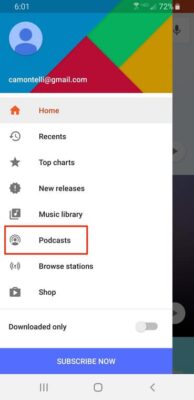
- Browse or search the available podcasts until you see one that you fancy. As soon as you see that particular one, click on it.
- Swipe through the podcast’s episode listing and click on the episode you wish to listen to. As soon as it begins to play, you can make adjustments to the volume.
- If you love what you are listening to and you wish to save the podcast for future hearing, click “Subscribe” to subscribe to it. When you subscribe, the podcast will be seen under “Your Podcasts” in the Google Play Music app, meaning you will never have to search for it every time you want to listen to a fresh episode.

You Might Also Want To Read: How To Listen To Podcasts On Your iPhone?
Be aware that there are other applications that will let you listen to podcasts. A few other options are Spotify, Apple Podcasts, and Soundcloud.
Tips for Podcasting
- Understand why you’re producing a podcast
Every achievement started with a goal. You must know why you are willing to start. You must know what you intend to achieve with it.
- Be detail-oriented
Do not rush anything. Focus on the details and concentrate on quality.
- Remain flexible
There will be issues and “no show” situations once in a while as you produce, you just have to stay flexible.