
Microsoft OneNote is a program that is super useful for free-form info gathering and multi-user collaboration. The platform simply grabs users’ notes, drawings, audio and it can then be shared on the internet or via a network.
Page Contents:
OneNote preserves info in pages organized into sections and it helps in the collection, organization, and sharing of unpublished materials, just like word processors and wikis, which mostly target publishing as well.
OneNote is a well known note-taking application that can be accessed on both the Mac and Windows as a free download or alongside a Microsoft 365 subscription. However, if OneNote installation happens on your PC and you later decide you are done with it, it can easily get uninstalled to create space on your computer’s hard drive. See How To Uninstall Microsoft OneNote From Your Computer Or Mac:
How Can I Uninstall OneNote From My Windows Computer?
- Tap Start.
- Access “Settings,” which looks like a little gear.
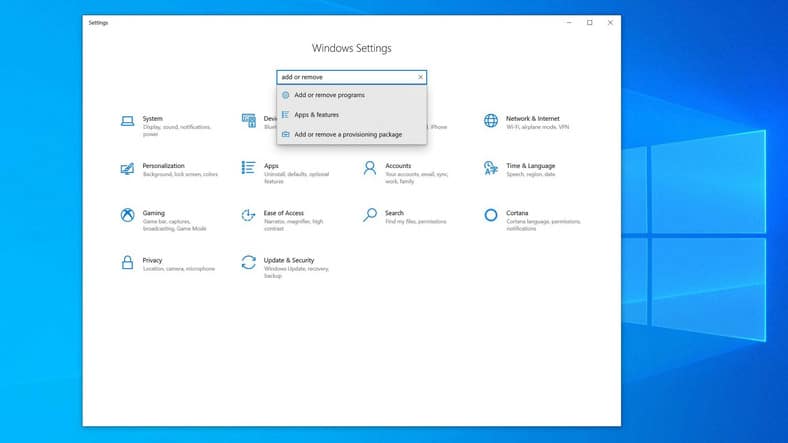
- As soon as the Settings window is seen, find the “Find a setting” search box way up on the display and type “add or remove.”
- Tap “Add or remove programs.”
You Might Also Want To Read: 6 ways to use Microsoft Office for free without paying
- Swipe through the list of installed programs and locate OneNote or enter “OneNote” in the “Search this list” box to narrow the results.
- Tap OneNote and then tap “Uninstall.”
- Confirm your decision to uninstall.
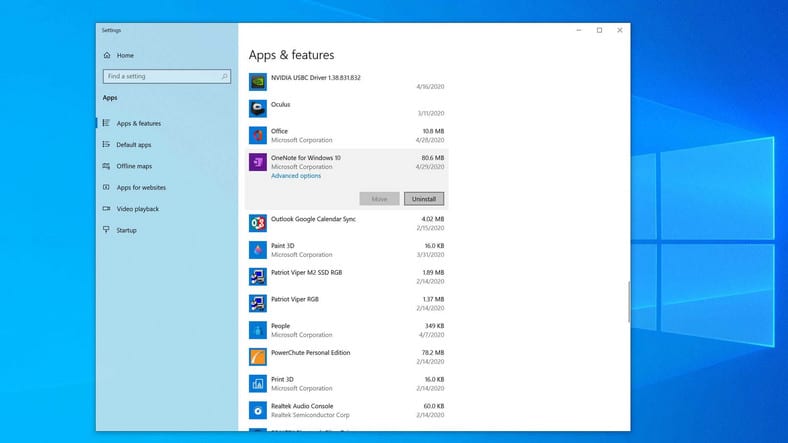
- Choose OneNote and then tap “Uninstall.”
How Can I Uninstall OneNote From A Mac Computer?
- In the Finder, tap “Applications.” A list of all the applications installed on your PC will be visible.
- Locate OneNote and drag it to Trash.
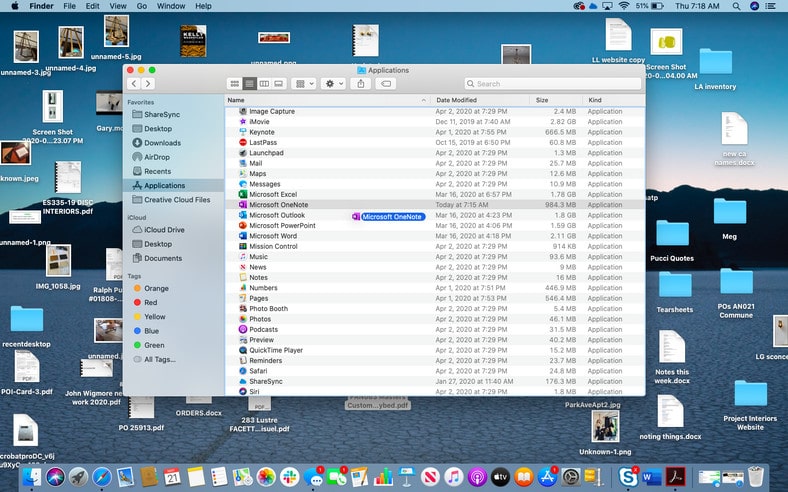
- You Might Also Want To Read: The best applications for taking notes on AndroidIf OneNote is in the Dock on the desktop, drop the icon from the Dock to the Trash too.
That is that.