
It does not matter the iPhone you have, your iOS device is able to save a huge number of songs, which is very key for enjoying music offline when a streaming service such as Spotify or Apple Music cannot be used.
Page Contents:
However, if you adore music, your music collection can be very high and this can mess up your device’s storage space.
If you feel your songs is occupying too much space on your iPhone, it is simple to do something about your collection. Your iPhone has simplified the process of finding how many songs you have downloaded to your phone, and how much MB they are taking up even if the 2 information are saved in different places. Below is How To View How Many Songs You Have On Your iPhone:
How Can I See How Many Songs I Have On My iPhone?
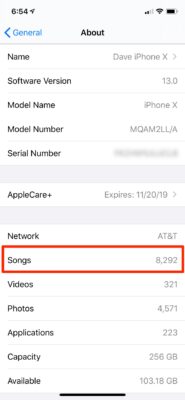
- Launch the Settings application.
- Click “General.”
- Tap “About.”
- Swipe down to locate “Songs.” You will see how many songs are presently stored on your iPhone.
You Might Also Want To Read: How To Add A Device To Find My iPhone To Trace The Location Of Your iPhone?
How Can I See How Much Storage Space My Songs Are Taking Up On My iPhone?
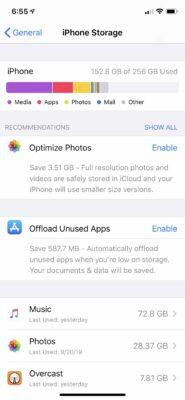
- Launch the Settings app.
- Click “General.”
- Click “iPhone Storage.” On the iPhone Storage page, you will see a graph that breaks down how much space all types of files are occupying on your device, including applications, pictures, mail, media and so on.
- Swipe down to “Music.” The total amount of storage space music is taking up will be visible.
You Might Also Want To Read: How to Lock or Unlock your Titanium Apple Card on iPhone