
With a little trick, you can read or view WhatsApp chats that have been deleted by the sender of the message. The reason the sender deleted the WA message was probably because there was a typo, claimed to be single, sent wrongly, and others.
Actually, this WhatsApp application was not provided with the delete chat feature at first. However, because there are so many user requests related to this feature, the request arises. This also makes WhatsApp a more “human” application.
Because it is so “humane” that the deleted chat section is given a trace with the words This message has been deleted.
As a human being who is given a sense of curiosity, then writing like that will clearly trigger that curiosity. Then it appears in the brain to type “how to read deleted WA chat” on a search engine.
How to View Deleted WhatsApp Chats
To view or reopen a WhatsApp chat that has been removed by the sender, then you need to install History Notice or Notification History in advance via the Google Play Store.
- Install the Notification History app on the Play Store. Then run the application.
- Give access or Allow Permission to the application.
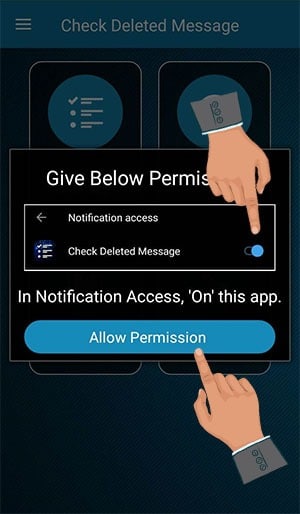
check whatsapp deleted messeges - Next, please activate the toggle on Check Deleted Message > OK.
- Congratulations. Now you will no longer be curious about the message that said the message that was deleted earlier. Here’s an example:
Well, if someday you still find messages that have been deleted by the sender, you can do the same way to read WhatsApp chats that have been deleted by the sender of the WA message.
Hope it helps and good luck!